Data Feeds
Bring live data in over an HTTP poll, a WebSocket or a webhook push — JSON, XML or text — and fold it into the store.
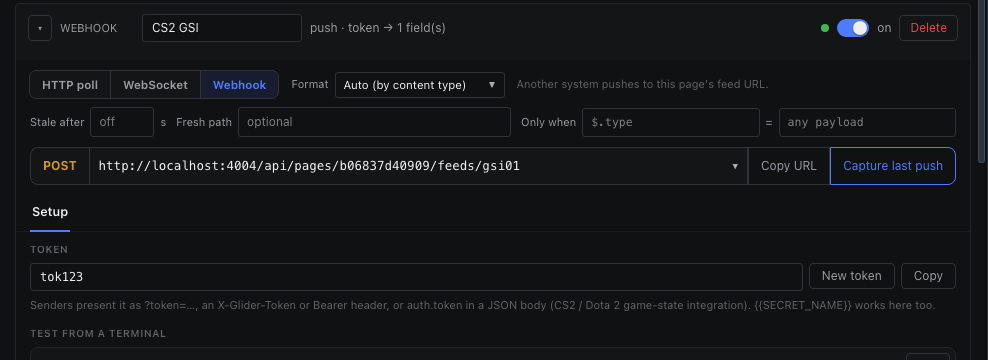
Let another system push to Glider.
A webhook feed has its own URL: /api/pages/<pageId>/feeds/<unitId>. The feed shows it with every address this machine answers on — pick the LAN address for a sender on another computer — and a Copy button. POST or PUT the raw body there.
| Token presented as | Example |
|---|---|
| Query string | ?token=<token> |
| Header | X-Glider-Token: <token> or Authorization: Bearer <token> |
| JSON body | {“auth”: {“token”: “<token>”}, …} — how CS2 and Dota 2 game-state integration sends it. The auth block is removed before mapping, so the token is never saved in a sample. |
curl -X POST "http://192.168.1.20:4004/api/pages/<pageId>/feeds/<unitId>" \
  -H "Content-Type: application/json" \
  -H "X-Glider-Token: <token>" \
-d '{"home": 2, "away": 1}'| Answer | Means |
|---|---|
| 200 | Delivered to the feed. |
| 401 | Missing or wrong token. |
| 404 | No webhook feed with that id on this page. |
| 409 | The feed is disabled. |
| 400 / 413 | The body did not parse with the feed's format, or it is over 1 MB. |
Capture last push reads what the endpoint received most recently and stores it as the feed's sample, so the Binder can offer its real fields. The Setup tab carries a ready-made gamestate_integration_glider.cfg for CS2 and Dota 2.