Components
The nine graphic component types and the six control widget types.
Cut a rectangle to a slant, chevron, notch or any outline.
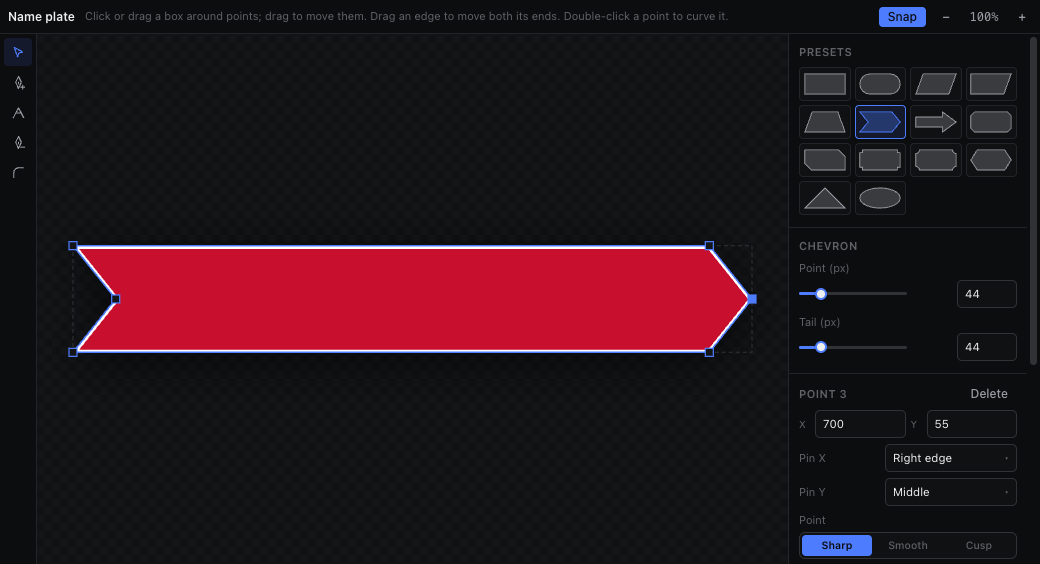
A rectangle can be cut to any outline in the Shape tab of the bottom dock. Select a rectangle and open the tab, or use Edit shape in its Inspector. The tab shows that rectangle large, with its real fill, border and shadow, and every change lands on the canvas, in Output and on air as you make it.
| Tool | Key | What it does |
|---|---|---|
| Select | V | Click or box-select points and drag them. Drag an edge to move both its ends. Double-click a point to curve it, an edge to add a point. Shift keeps a drag on one axis. |
| Add point | P | Click an edge to add a point there; a curved edge is split without changing its curve. Keep dragging to place the point. |
| Convert point | C | Click a point to switch it between sharp and curved; drag out of a point to pull curve handles; drag a handle to move it on its own. |
| Delete point | - | Click a point to remove it. A shape keeps at least three. |
| Corner | R | Drag out of a sharp point to cut its corner: round, bevel, scoop or notch (picked in the bar above the stage). |
Presets give the outlines lower thirds keep reaching for: parallelogram, slanted end, trapezoid, chevron, arrow, pill, cut and diagonal-cut corners, notched, ticket, hexagon, triangle and ellipse. A preset keeps its sliders (slant, point depth, cut size) until you move one of its points by hand.
- Fill, border and shadow stay in the Inspector and follow the outline: the border runs inside the edge like a CSS border, the shadow is cast by the shape. A shape replaces Radius; use the Corner tool instead.
- Each point is pinned to an edge, the middle, or scales with the box (Pin X / Pin Y). Slants and cuts pinned to an edge keep their size when the plate is resized, bound to data or animated wider, so a strap that grows with its name keeps a 24px slant.
- When the box resizes → Stretch makes the whole outline scale instead; Keep edges pins every point to its nearest edge again.
- Drags, slider moves and preset changes are one undo step each. Delete, the arrow keys (Shift for 10px) and ⌘/Ctrl+A work on the selected points while the stage has focus. The − / + buttons (or ⌘/Ctrl+wheel) zoom the stage; the rectangle stays centred, and clicking the percentage goes back to fit.
- Animations keep working on a shaped plate: wipes cut the outline, size animations redraw it, and background-colour lanes paint the fill.
- The AI agent shapes plates with the same tools (scene_primitives shape): presets and their sliders, points, corners, curves, pins and flips. It reads a plate's outline with numbered points, and the scene check warns (shape-cuts-copy) when text runs into a cut-away part of a plate.
- In the desktop app, ⧉ on the Shape tab pops it into its own window (close the window or Bring back to dock it again). It follows the editor's selection, drags there move the canvas live, and ⌘/Ctrl+Z there undoes in the editor.