Canvas
The design surface: navigation, selection, transform, snapping and ordering.
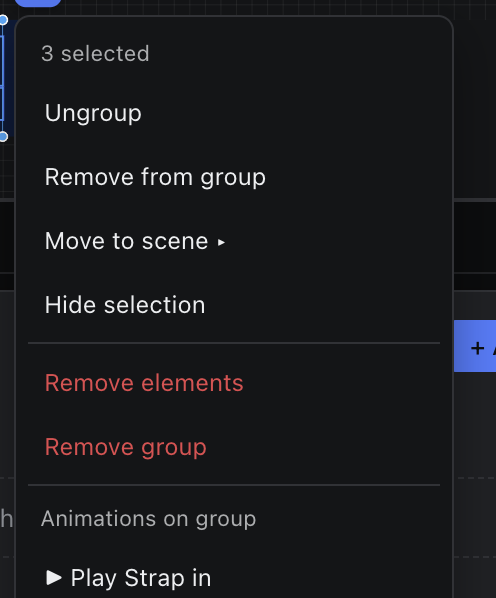
The right-click menu on the canvas.
Right-click a component, or inside the selection, for its context menu; the context-menu key or Shift + F10 opens it from the keyboard. The header names what it acts on — a component and its type, a group, or a count. Entries that have a shortcut show the key from your shortcut profile and do exactly what the key does, so Delete still asks first when Settings › General › Confirm before deleting is on.
| Entry | When it appears | What it does |
|---|---|---|
| Edit Text | One text the canvas can edit (not bound, not locked) | Edits it in place, as a double-click does. |
| Rename… | One component | Renames it; its id, which bindings point at, stays. A name another item next to it already has is refused. |
| Cut · Copy | One component | Copy takes one component, as Ctrl / Cmd + C does. Cut is off for a locked one. |
| Paste · Paste in Place | Always (off until something is copied) | Paste lands where you right-clicked. |
| Hide / Show · Lock / Unlock | Always | Toggles; a right-clicked locked item can be unlocked here. |
| Arrange ▸ | Always | Bring to Front, Bring Forward, Send Backward, Send to Back. |
| Group | Two or more components that are not one group | Groups them. |
| Ungroup | The selection is one whole group | Dissolves the group. |
| Add to Group ▸ | Other groups exist on the scene | Adds the selection to one of them. |
| Remove from Group | Part of a group is selected | Takes the selection out of it. |
| Move to Scene ▸ | Another scene of the same kind exists | Moves the selection there. |
| Play Animation ▸ | A workflow targets the component or group | Plays it to program. |
| Delete · Delete Group | Always · inside a group | Deletes the components (not locked ones), or the group. |
Entries marked ▸ open a list in place of the menu; Back or ← returns. Right-click empty canvas for Paste, Paste in Place, Select All and the zoom commands.